Last updated: November 2026
Key takeaways
- WCAG 2.2 adds nine success criteria to WCAG 2.1. Six are Level A or AA, so they apply to a WCAG 2.2 AA target.
- WCAG 2.2 keeps every WCAG 2.1 criterion except 4.1.1 Parsing, which the W3C removed as obsolete. Building to WCAG 2.2 AA covers the WCAG 2.1 AA standard named by ADA Title II.
- EN 301 549 V4.1.1, published September 2, 2026, moves the EU baseline to WCAG 2.2 AA. Ireland’s NDA expects its Official Journal citation on December 16, 2026.
- Fix courses in LEARN order: Log in, Engage, Act, Respond, Need help.
- Test with an automated scan, a keyboard pass and a screen reader. A scan alone cannot confirm conformance.
Many eLearning teams built their checklists around WCAG 2.1. The newer version adds criteria that hit course players hard: sticky bars that hide keyboard focus, drag-and-drop activities, small Next buttons and LMS logins.
This guide to WCAG 2.2 for eLearning is for instructional designers, learning technologists and content managers. You get the new criteria mapped to real course features, the US and EU rules, a testing approach, and a ladder for what to fix first.
Not sure where your courses stand? Send us one module and request a free sample task to see an issue log.
What is WCAG 2.2 for eLearning?
WCAG 2.2 for eLearning means applying the W3C’s Web Content Accessibility Guidelines 2.2 to online courses: the course player, lessons, media, quizzes and the LMS screens around them. WCAG 2.2 became a W3C Recommendation on October 5, 2023. It adds nine success criteria to WCAG 2.1 and removes one, 4.1.1 Parsing.
Criteria sit at three levels. Level A covers the most basic barriers, Level AA is what most laws and contracts ask for, and Level AAA is the strictest.
What changed from WCAG 2.1 to WCAG 2.2
The W3C’s What’s New in WCAG 2.2 page says the 2.0 and 2.1 criteria are essentially the same in 2.2, except that 4.1.1 Parsing is obsolete and removed.
The W3C explains that assistive technology now relies on the browser instead of parsing markup itself. Many issues that would have failed 4.1.1 now fail 1.3.1 Info and Relationships or 4.1.2 Name, Role, Value. Broken player code still matters; it is just reported elsewhere.
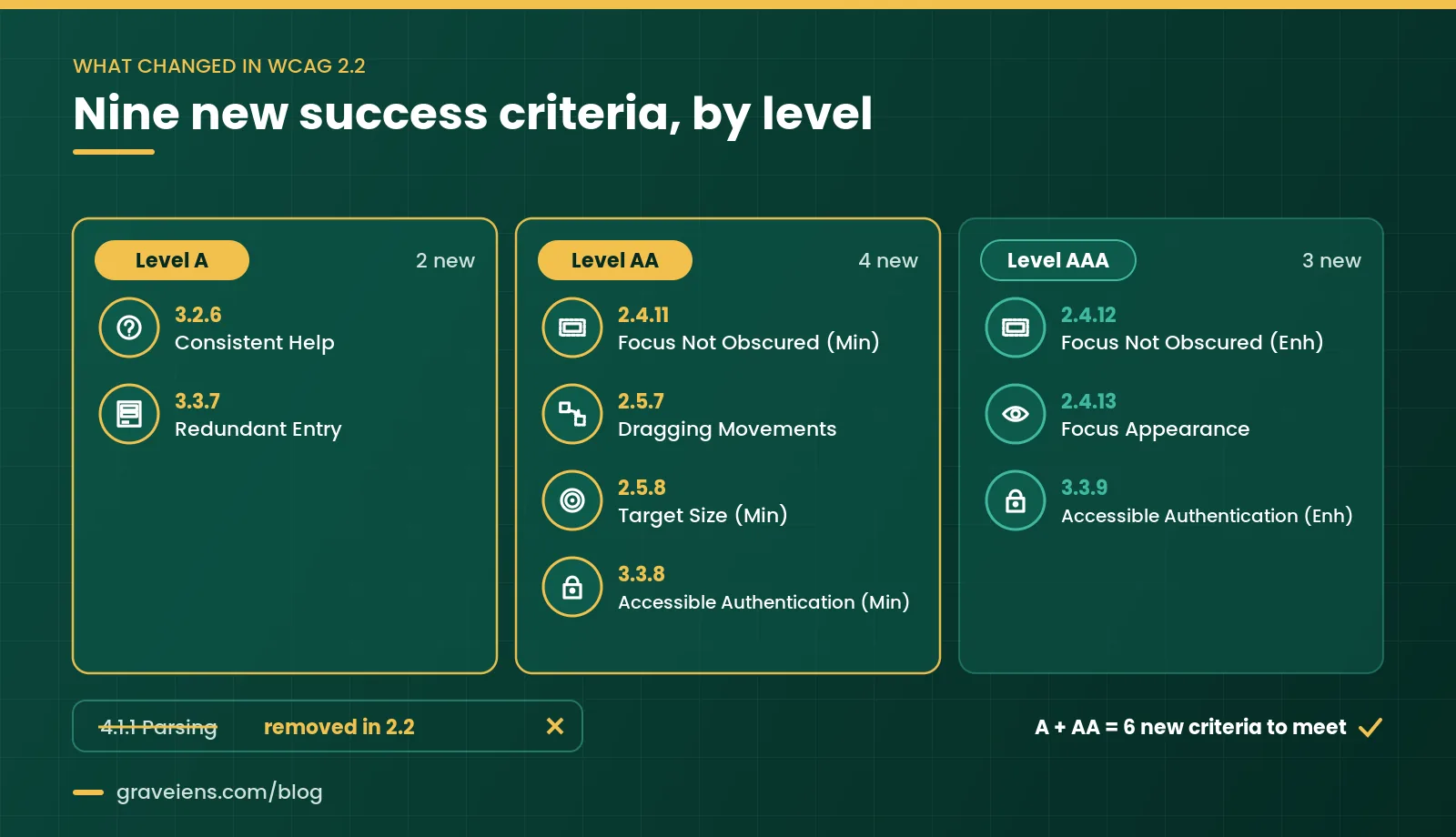
- Level A: 3.2.6 Consistent Help; 3.3.7 Redundant Entry.
- Level AA: 2.4.11 Focus Not Obscured (Minimum); 2.5.7 Dragging Movements; 2.5.8 Target Size (Minimum); 3.3.8 Accessible Authentication (Minimum).
- Level AAA: 2.4.12 Focus Not Obscured (Enhanced); 2.4.13 Focus Appearance; 3.3.9 Accessible Authentication (Enhanced).
In short: For WCAG 2.2 AA, add six checks to your WCAG 2.1 AA list and drop 4.1.1 Parsing.
Which accessibility standards apply to online courses in the US and EU?
In the US, ADA Title II names WCAG 2.1 AA for state and local government web content, including public colleges and universities. Section 508 incorporates WCAG 2.0 AA for federal agencies. In the EU, EN 301 549 supports the European Accessibility Act and the Web Accessibility Directive, and its newest version references WCAG 2.2 AA.
United States: ADA Title II and Section 508
The ADA.gov fact sheet sets WCAG 2.1 Level AA as the Title II technical standard. It names public schools, community colleges and public universities as covered entities. Web content includes text, images, sound, videos and documents, so course pages and lecture videos are in scope.
As of November 7, 2026, ADA.gov lists April 26, 2027 as the compliance date for entities of 50,000 or more people, and April 26, 2028 for smaller entities. See our ADA Title II deadline guide for public institutions for scope and exceptions.
Section508.gov states that the Revised 508 Standards incorporate WCAG 2.0 Level AA for web and non-web content. A page that fails even one of the 38 applicable criteria does not conform. The standards also cover authoring tools.
European Union: EAA, the Web Accessibility Directive and EN 301 549
Ireland’s National Disability Authority (NDA) notes that the European Accessibility Act commenced on June 28, 2025. It applies to companies trading in the EU, wherever they are based, for the products and services it covers. Our European Accessibility Act guide for publishers explains scope. The Web Accessibility Directive covers public sector websites and apps.
EN 301 549 is the technical reference for both laws. The NDA reports that V4.1.1 was published online on September 2, 2026. Its web, document and software clauses now reference WCAG 2.2 Level AA. It becomes legally effective once cited in the Official Journal of the EU, expected December 16, 2026. Until then, V3.2.1, built on WCAG 2.1, remains in force.
Why build to WCAG 2.2 AA now
- One target for both markets. WCAG 2.2 AA meets the WCAG 2.1 AA criteria, minus the obsolete Parsing rule, and matches the new EN 301 549 baseline.
- US rules allow it. ADA.gov notes the rule permits alternatives that give the same or more accessibility, called equivalent facilitation.
- Courses live for years. Building the six extra checks in now avoids reopening modules later.
In short: Building to WCAG 2.2 AA meets US criteria and prepares EU-facing courses for EN 301 549 V4.1.1.
How do the new WCAG 2.2 criteria show up in eLearning?
They show up wherever learners move through a course player, interact with activities, answer questions or sign in. Sticky player bars can hide keyboard focus. Drag-and-drop tasks need a click alternative. Small navigation buttons need 24 by 24 CSS pixels or enough spacing. Help placement, repeated form data and LMS logins also have new rules.
| Criterion (level) | Where it shows up in courses | Typical fix |
|---|---|---|
| 2.4.11 Focus Not Obscured, Minimum (AA) | Sticky player bars, transcript drawers, cookie banners | Keep focused items at least partly visible |
| 2.5.7 Dragging Movements (AA) | Drag-to-match, sorting, label-the-diagram | Add click-to-select, click-to-place |
| 2.5.8 Target Size, Minimum (AA) | Next and Back, play, captions toggle, hotspots | 24 by 24 CSS pixels or enough spacing |
| 3.2.6 Consistent Help (A) | Help, contact and chat links across modules | Same relative order on every screen |
| 3.3.7 Redundant Entry (A) | Enrollment flows, surveys, multi-page tests | Auto-fill or offer earlier answers |
| 3.3.8 Accessible Authentication, Minimum (AA) | LMS and platform sign-in | Allow paste and password managers |
Focus Not Obscured in course players
Under 2.4.11, a focused control must not be entirely hidden by author-created content. Fixed headers, bottom navigation bars, transcript panels and cookie banners are the usual culprits. At AAA, 2.4.12 requires full visibility, and 2.4.13 Focus Appearance sets size and 3:1 contrast rules for the focus indicator.
Dragging Movements in drag-and-drop interactions
Criterion 2.5.7 says anything done by dragging must also work with a single pointer without dragging, unless dragging is essential. Add a click-to-select, click-to-place mode, or up and down buttons for ordering. Keyboard support under 2.1.1 is a separate requirement.
Target Size for navigation buttons
Under 2.5.8, pointer targets must be at least 24 by 24 CSS pixels. Smaller targets can pass with enough spacing, and links inside sentences are exempt. The W3C’s Understanding Target Size (Minimum) page explains the spacing test. Check player icons, media controls, pop-up close buttons and quiz radio buttons.
Consistent Help across modules
Criterion 3.2.6 does not require help. It says repeated help, such as contact details, self-help pages or a chatbot, must keep the same relative order across pages. If Help sits top right in Module 1, keep it there in Module 8.
Redundant Entry in multi-step forms and quizzes
Criterion 3.3.7 says information already entered in the same process must be auto-filled or available to select. Enrollment flows that ask for an email twice fail. Exceptions cover re-entry that is essential, needed for security, or no longer valid. If recall is the point of a quiz item, the essential exception may apply.
Accessible Authentication for LMS login
Criterion 3.3.8 says no login step may require a cognitive function test, such as recalling a password or solving a puzzle, without an alternative or helping mechanism. The W3C names password-manager support and copy-and-paste as examples. Never block paste in password fields.
How to apply WCAG 2.2 to SCORM and xAPI players, authoring tools, video and quizzes
SCORM and xAPI course players
SCORM and xAPI define how courses are packaged and report progress. They are not accessibility standards, so a package can track perfectly and still fail. Test inside the LMS your learners use. Its launch frame and toolbar can change focus order and hide focus.
Authoring-tool outputs
Most issues come from shared templates. Review the player skin, built-in interaction types and custom script triggers. Ask the tool vendor for its Accessibility Conformance Report and check which WCAG version it covers. Fix the template or master slide, not each screen.
Video, captions and audio description
Prerecorded video needs captions under 1.2.2 (Level A) and audio description under 1.2.5 (Level AA). Live webinars need live captions under 1.2.4 (Level AA). Player controls must work by keyboard and meet the new target size rule.
Quizzes and assessments
Label every answer field. Identify errors in text, not color alone. Let learners extend time limits under 2.2.1 Timing Adjustable. Announce “Correct” or “Try again” as a status message under 4.1.3. For course handouts, see our step-by-step guide to accessible PDF remediation.
How do you test eLearning for WCAG 2.2 conformance?
Test eLearning in layers. Scope a sample that covers every template and interaction type. Run an automated scan, then tab through every screen with a keyboard. Next, review key flows with a screen reader. Fix issues at the template level, retest, and record results against each WCAG 2.2 success criterion.
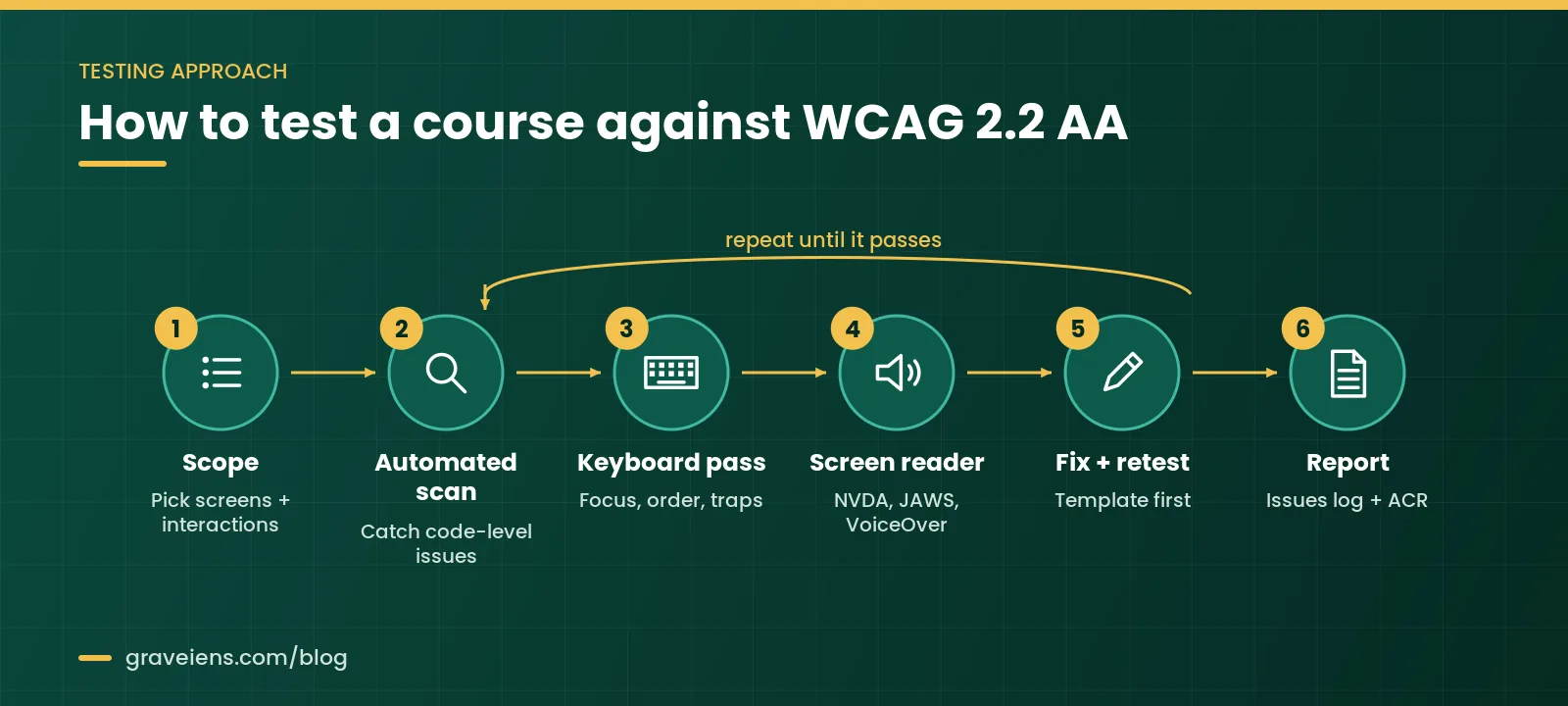
- Scope: Pick each player template, interaction type and media type, plus login, enrollment and quiz flows.
- Automated scan: Catch missing names, low contrast and missing language settings. Dragging, help placement and redundant entry need a person.
- Keyboard pass: Unplug the mouse. Check that focus is visible, never fully hidden, logical and never trapped.
- Assistive technology: Use NVDA or JAWS on Windows, VoiceOver on Apple devices and TalkBack on Android. Also zoom to 200 percent and check reflow.
- Fix and retest: Fix shared templates first, then retest the same sample.
- Report: Keep an issue log mapped to success criteria, and an Accessibility Conformance Report if buyers ask.
What to fix first: the LEARN priority ladder
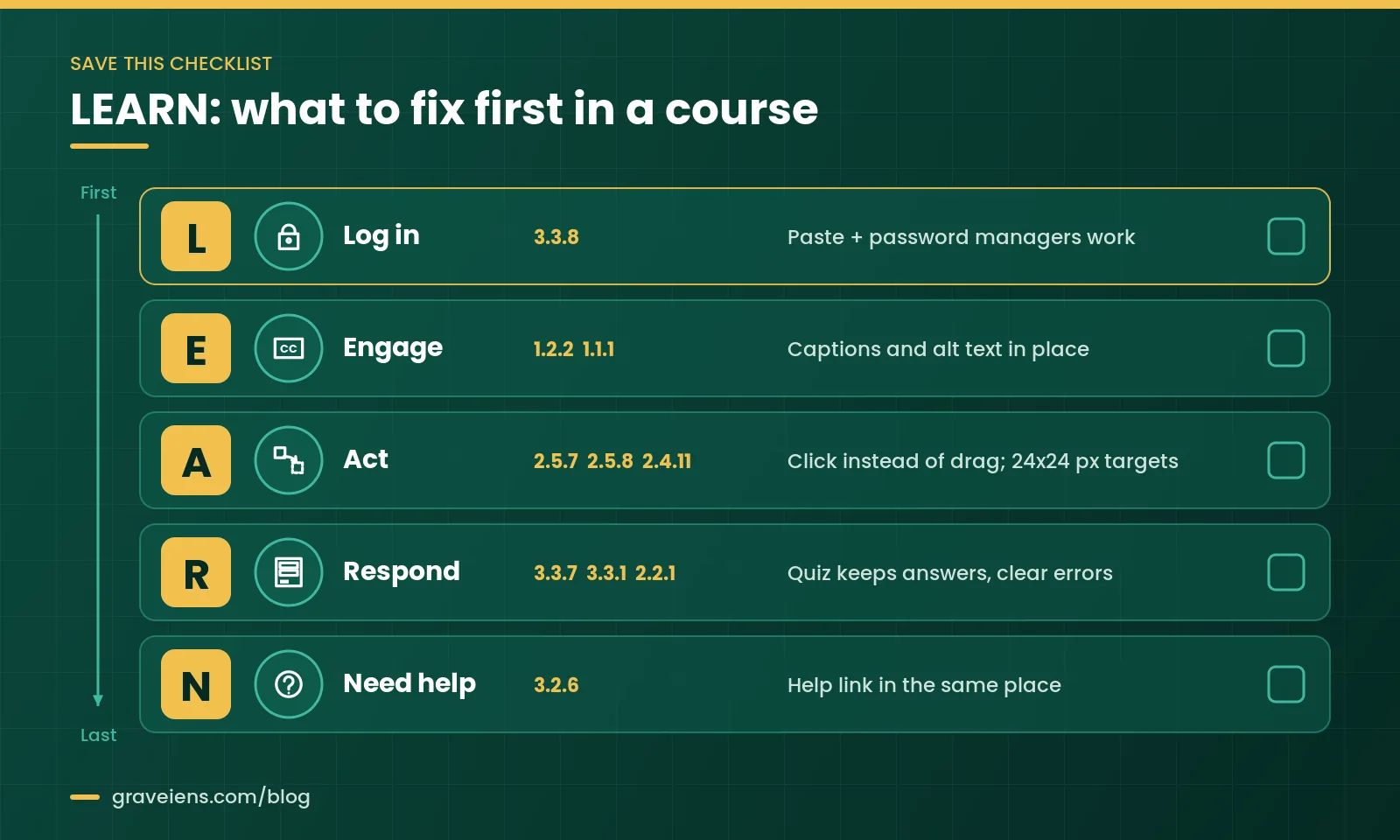
The LEARN priority ladder is our five-step order for fixing a course. It follows the learner’s path: Log in, Engage, Act, Respond, Need help. Each step is a gate. A learner who cannot sign in never sees your captions, and one who cannot finish a drag activity never reaches the quiz.
L: Log in
Fix sign-in first, because it blocks everything. Allow paste and password managers, and offer single sign-on or an email link (3.3.8).
E: Engage with content
Add captions and audio description to video (1.2.2, 1.2.5), alt text to meaningful images (1.1.1), and check contrast.
A: Act and navigate
Fix hidden focus (2.4.11), add click alternatives to drag tasks (2.5.7), enlarge small targets (2.5.8) and confirm keyboard access (2.1.1).
R: Respond to assessments
Keep earlier answers (3.3.7), describe errors in text (3.3.1), allow more time (2.2.1) and announce feedback (4.1.3).
N: Need help
Keep help, contact and chat options in the same place on every screen (3.2.6).
LEARN quick checklist
- Can learners paste a password or use a password manager?
- Does every video have captions, and every meaningful image alt text?
- Can every drag task be done with clicks, with focus always visible?
- Are Next, Back and media controls 24 by 24 CSS pixels or well spaced?
- Do quizzes keep answers, explain errors and allow more time?
- Is Help in the same place in every module?
In short: Clear the blockers that stop learners entering or finishing a course before you polish anything else.
Have a course library to sort? Get a scoped quote after we review a sample module against WCAG 2.2 AA.
How much effort does WCAG 2.2 eLearning remediation take?
Effort depends on how a course was built, not on its length. Courses built from one clean template with standard interactions are quicker to fix. Custom drag-and-drop activities, uncaptioned video, missing source files and custom quiz engines add the most work. Fixing a shared template once can repair many modules at a time.
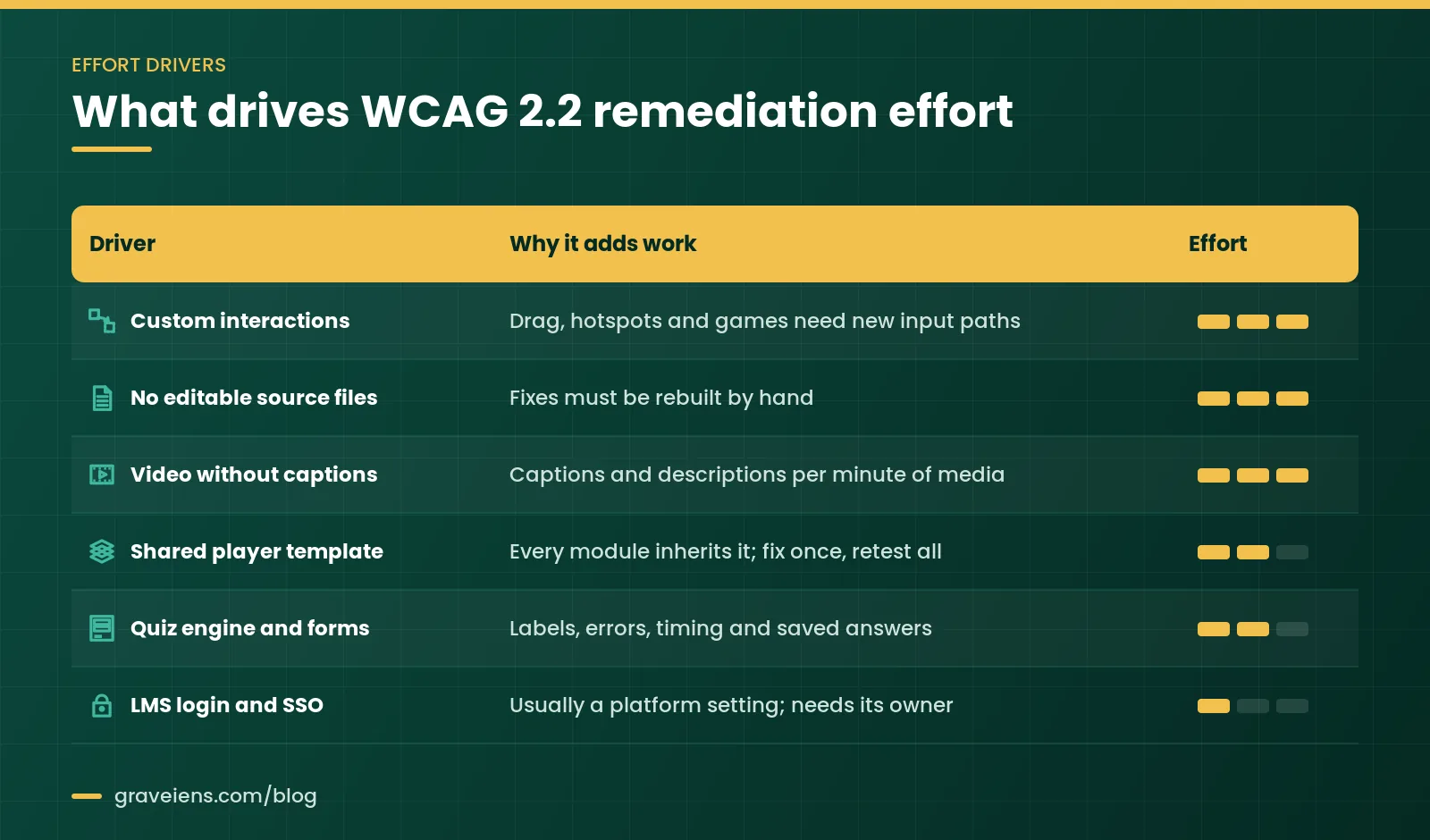
| Effort driver | Why it adds work | How to reduce it |
|---|---|---|
| Custom interactions | Need new input methods and retesting | Use accessible built-in interaction types |
| No editable source files | Outputs must be rebuilt, not edited | Keep sources in a versioned library |
| Video without captions | Work scales with minutes of media | Caption at production time |
| Shared player template | Every module inherits its issues | Fix once, retest a sample |
| Quiz engines and forms | Labels, errors, timing and feedback | Standardize one question template |
| LMS login and single sign-on | Owned by the platform team | Raise 3.3.8 with the owner early |
A pilot is the most reliable way to plan. Audit and fix one module that reflects your real mix, then estimate the rest. Our accessibility remediation services page explains how we scope this work.
Common WCAG 2.2 eLearning mistakes to avoid
- Testing outside the LMS. The launch frame changes focus behavior.
- Treating keyboard support as the drag fix. 2.5.7 needs a non-drag pointer option too.
- Shrinking player icons. Small, crowded targets fail 2.5.8.
- Blocking paste at login. It works against 3.3.8.
- Fixing screens, not templates. The next publish brings issues back.
- Trusting a clean automated report. Many issues need a human tester.
- Leaving the version out of contracts. Write “WCAG 2.2 AA” in every statement of work.
How GravEiens EduServices approaches WCAG 2.2 for eLearning
GravEiens EduServices has supported education publishers and institutions since 2017. We have worked with 350+ global clients, with a team of 700+ experts, and delivered 2M+ digital assets and 10,000+ learning resources. Our quality system is ISO 9001 certified.
Projects run through our four-stage QA workflow: content creation, internal review, client review and final delivery. We start with a sample module, agree the target standard with you, and fix in LEARN order, templates first. For new courses, our accessible eLearning content development team builds to WCAG 2.2 AA from the storyboard stage.
Frequently asked questions about WCAG 2.2 for eLearning
Is WCAG 2.2 legally required for eLearning in the US?
Not by name. ADA Title II names WCAG 2.1 AA for state and local government web content, including public colleges, and Section 508 incorporates WCAG 2.0 AA for federal agencies. Because WCAG 2.2 AA keeps the 2.1 criteria except the obsolete 4.1.1 Parsing, building to it meets the 2.1 AA target.
Does meeting WCAG 2.2 AA also meet WCAG 2.1 AA?
For practical purposes, yes. The W3C says the 2.0 and 2.1 success criteria are essentially the same in 2.2, with one exception: 4.1.1 Parsing was removed as obsolete. Issues that used to fail Parsing are now usually reported under 1.3.1 Info and Relationships or 4.1.2 Name, Role, Value.
Does drag-and-drop fail WCAG 2.2?
Not by itself. Success Criterion 2.5.7 Dragging Movements (Level AA) requires that anything done by dragging can also be done with a single pointer without dragging, unless dragging is essential. Add a click-to-select, click-to-place mode or arrow buttons, and keep keyboard support under 2.1.1.
What target size does WCAG 2.2 require for course buttons?
Success Criterion 2.5.8 Target Size (Minimum), Level AA, asks for pointer targets of at least 24 by 24 CSS pixels. Smaller targets can pass with enough spacing, and links inside sentences are exempt. For Next, Back and play controls, the 44 by 44 CSS pixels of 2.5.5 Target Size (Enhanced) is a safer aim.
Do SCORM or xAPI make a course accessible?
No. SCORM and xAPI define how courses are packaged and how they report progress to an LMS. They do not set accessibility requirements, so a course can track perfectly and still fail WCAG 2.2. Test inside the LMS your learners use, because its launch frame can change focus order.
When does EN 301 549 V4.1.1 take effect in the EU?
EN 301 549 V4.1.1, which references WCAG 2.2 AA, was published online on September 2, 2026. Ireland’s National Disability Authority says it takes legal effect once cited in the Official Journal of the EU, expected on December 16, 2026. Until then, V3.2.1, based on WCAG 2.1, remains in force.
See your course issues before you commit
Send us one module or a sample of screens. We will test it against WCAG 2.2 AA, share an issue log in LEARN order, and show fixed output.
Sources
- W3C WAI: What’s New in WCAG 2.2
- W3C: Web Content Accessibility Guidelines (WCAG) 2.2
- W3C WAI: Understanding Success Criterion 4.1.1 Parsing (Obsolete and removed)
- W3C WAI: Understanding Success Criterion 2.5.8 Target Size (Minimum)
- ADA.gov: Fact Sheet: New Rule on the Accessibility of Web Content and Mobile Apps Provided by State and Local Governments
- Section508.gov: Applicability and Conformance Requirements
- National Disability Authority (Ireland): Updated EN 301 549 Standard Strengthens Accessibility Requirements for ICT Products and Services
About the author
GravEiens EduServices Editorial Team. Our editorial team writes practical guides on accessible learning content, eLearning development and digital production for education publishers and institutions. Articles draw on the work of our accessibility and production specialists and are checked against primary sources.

 Accessibility
Accessible PDF Remediation for Universities: Tags, Reading Order and Testing
Accessible PDF remediation step by step: tags, reading order, alt text, tables and testing for WCAG 2.1 AA and PDF/UA.…
 Accessibility
How to Choose an Accessibility Remediation Vendor: 10 Questions to Ask
Hiring an accessibility remediation vendor? Use our 10-question scorecard to compare testing, formats and reporting. Request a free sample task.
 Accessibility
European Accessibility Act for Publishers: How to Remediate Your EPUB Backlist
European Accessibility Act publishers guide: EAA ebook rules, backlist timing, EPUB triage and cost drivers. Send 3 sample titles for…
Get monthly EdTech insights
Trends, content tips and how-tos — once a month, no spam.