Last updated: October 2026
Key takeaways
- The current ADA Title II deadline is April 26, 2027 for public colleges and universities that belong to a state or local government of 50,000 or more people, and April 26, 2028 for smaller entities and special districts, per a DOJ interim final rule published April 20, 2026.
- The standard did not change. Course pages, PDFs, slides, videos and math content must meet WCAG 2.1 Level AA, including content behind an LMS login.
- The dates are contested. A federal lawsuit filed in May 2026 asks a court to restore the original 2026 and 2027 dates, so plan to the earliest plausible date.
- Private colleges are not covered by this rule, but they still have ADA Title III and Section 504 duties, and the separate HHS Section 504 web rule can apply to HHS-funded institutions.
- Start with inventory and templates, then fix high-enrollment courses first. Our TRIAGE plan below shows the order.
Public colleges have run out of easy time. The ADA Title II deadline for web and course content now falls on April 26, 2027 for most public universities, and every week of delay shrinks the window to fix thousands of course pages, PDFs and lecture videos. This guide is for accessibility coordinators, digital learning leaders and provosts’ offices. It explains the verified dates, what content is in scope, what WCAG 2.1 AA means for real course materials, and a prioritized plan you can start this term.
Not sure where your courses stand? Request a free sample task and we will check a slice of your content against WCAG 2.1 AA.
This article is general information, not legal advice. Confirm how the rule applies to your institution with your counsel.
What is the ADA Title II deadline?
The ADA Title II deadline is the date public entities must make web content and mobile apps meet WCAG 2.1 Level AA. As of October 2026, it is April 26, 2027 for entities serving 50,000 or more people and April 26, 2028 for smaller entities and special districts. DOJ set these dates in an April 20, 2026 interim final rule.
Here is how the dates got here. The Department of Justice published its Title II web and mobile accessibility rule (28 CFR part 35, subpart H) on April 24, 2024. That rule originally required compliance by April 24, 2026 for large entities and April 26, 2027 for small entities and special districts.
On April 20, 2026, four days before the first date, DOJ published an interim final rule in the Federal Register (91 FR 20902). It took effect the same day and moved each date back by one year. The ADA.gov fact sheet on the web rule now shows the new dates.
What changed, and what did not
- Changed: only the two compliance dates.
- Not changed: the technical standard (WCAG 2.1 Level AA), the scope of covered content and the five limited exceptions.
- Still in force: the existing Title II duty to provide effective communication and equal access. DOJ’s interim rule says covered entities have an “ongoing obligation” to make online services accessible, regardless of the compliance dates.
Why the status is still uncertain
Three open issues could move the ADA Title II deadline again. Treat each as a planning risk, not a reason to wait.
- Litigation. On May 21, 2026, the National Federation of the Blind sued DOJ and HHS in federal court in Maryland. The suit argues both one-year delays skipped required notice and comment, and asks the court to restore the original dates. As of early October 2026, we found no published ruling that changes the dates.
- Further rulemaking. DOJ said it will consider proposing changes to the rule’s substance during the extension period. It also said that, absent such a proposal or a reason for further delay, it “fully anticipates implementing the regulation at the new deadline.”
- Comments. The comment period on the interim rule closed June 22, 2026. DOJ has not published a final action on those comments as of this update.
In short: plan to the earliest plausible date. If a court restored the original schedule, the large-entity date would already have passed. Build your plan so your highest-use courses conform well before April 26, 2027.
Who the rule covers: ADA Title II compliance in higher education
Title II applies to state and local governments and their agencies. ADA.gov lists “public schools, community colleges, and public universities” as examples. A public institution’s date depends on the population of the government it belongs to, not on its own enrollment.
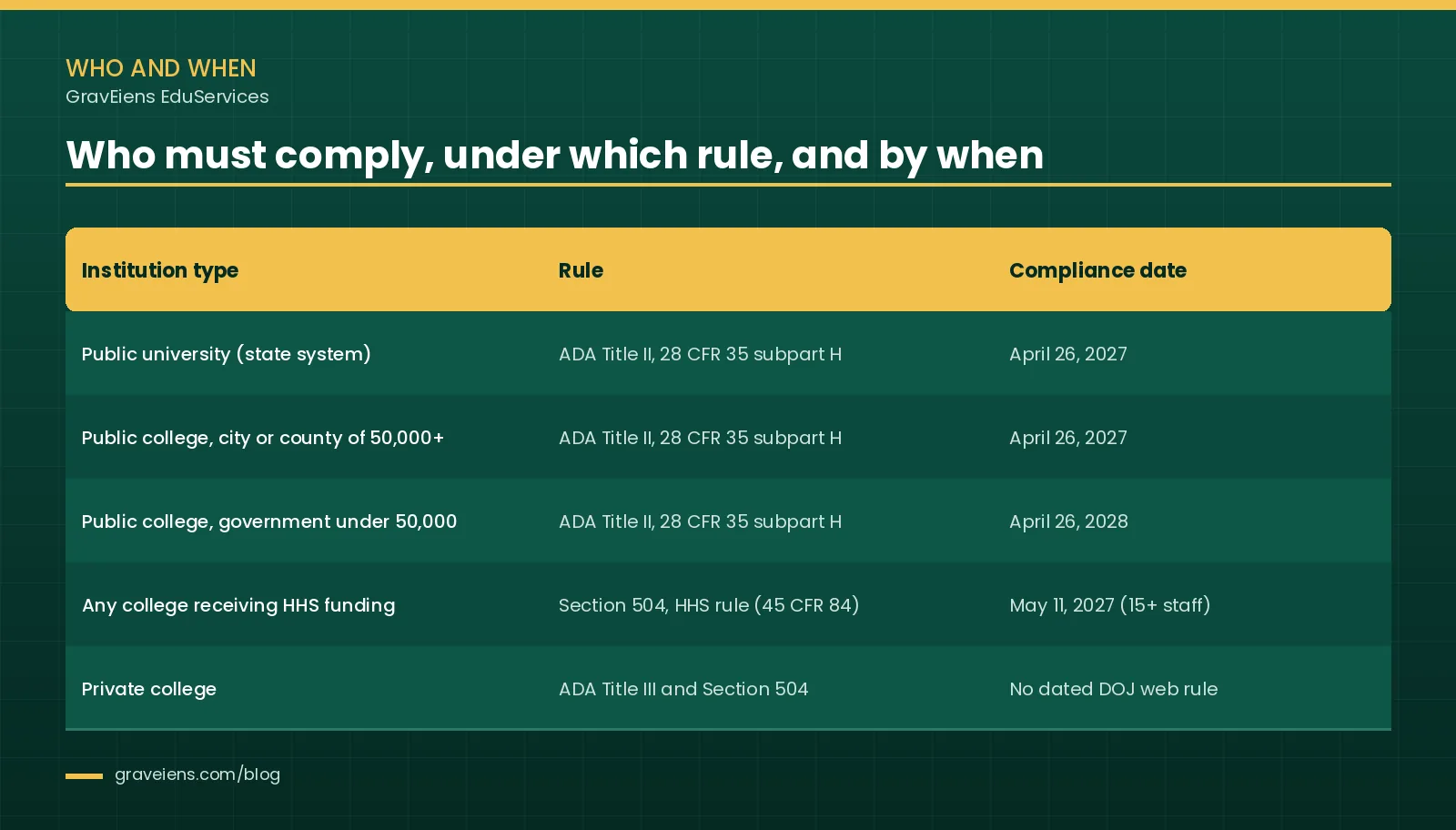
| Institution type | Rule | Compliance date |
|---|---|---|
| Public university that is part of a state system | ADA Title II, 28 CFR part 35, subpart H (state population is far above 50,000) | April 26, 2027 |
| Public college run by a city or county of 50,000+ | ADA Title II, subpart H | April 26, 2027 |
| Public college run by a government under 50,000, or a special district government | ADA Title II, subpart H | April 26, 2028 |
| Any college that receives HHS financial assistance (for example, research or health grants) | Section 504, HHS web rule (separate from Title II) | May 11, 2027 with 15+ employees; May 10, 2028 with fewer |
| Private, nonprofit or for-profit college | ADA Title III and Section 504 (if federally funded) | No dated DOJ web rule; existing duties apply now |
Public colleges and universities
State universities take the population of their state, so nearly all of them fall under the April 26, 2027 date. Community colleges run by a city or county use that government’s population. Some community college districts are organized differently under state law, so confirm your classification with counsel. If in doubt, plan to the 2027 date.
Private colleges and universities
Private institutions are not Title II entities, so the Title II rule and its dates do not apply to them. They are covered by ADA Title III as places of education, and most are bound by Section 504 because they receive federal financial assistance. DOJ has not set a dated web technical standard under Title III, but the duty to provide equal access and effective communication still applies, and lawsuits continue.
One rule does carry a date for many private campuses. HHS’s Section 504 web rule covers recipients of HHS funding, public or private. An HHS interim final rule published May 11, 2026 moved its compliance dates to May 11, 2027 for recipients with 15 or more employees. That rule is also named in the NFB lawsuit.
Where Section 508 fits
Section 508 sets accessibility requirements for federal agencies’ technology. It does not directly regulate colleges. Many institutions still use 508-based accessibility conformance reports when they buy software, and some states reference 508 or WCAG in their own laws.
What content is in scope for the ADA Title II deadline?
The rule covers web content and mobile apps a public entity provides or makes available, directly or through contracts and licenses. For a college, that means LMS course pages, uploaded PDFs and slides, lecture videos, math and STEM images, and vendor courseware. Only five narrow exceptions apply, and course content has no blanket exemption.
That last point matters. DOJ’s 2023 proposed rule included exceptions for some password-protected course content. DOJ removed those exceptions from the final 2024 rule, and the April 2026 interim rule confirms they are gone. Content behind an LMS login is in scope.
Content colleges usually need to fix
- LMS course pages: headings, link text, tables, embedded media and quiz interfaces in Canvas, Blackboard, Moodle, Brightspace or similar platforms.
- PDFs and documents: syllabi, readings, lab manuals and handouts. Scanned PDFs are the hardest, because they contain no real text until OCR is run.
- Slides: lecture decks with missing titles, low contrast or text locked inside images.
- Video and audio: lecture recordings need accurate captions; prerecorded video also needs audio description where visuals carry meaning.
- Math and STEM images: equations saved as pictures, graphs, chemical structures and circuit diagrams.
- Third-party content you provide: publisher courseware, homework platforms and embedded tools licensed by the college.
The five exceptions, read precisely
ADA.gov summarizes five exceptions. Each has conditions, and content that fails any condition is back in scope.
- Archived web content: created before the compliance date (or reproducing older physical media), kept only for reference, research or recordkeeping, stored in a dedicated archive area, and unchanged since archiving. All four conditions must hold.
- Preexisting conventional electronic documents: word processing, presentation, PDF or spreadsheet files posted before the compliance date. This does not cover documents currently used to apply for, access or participate in a program. A pre-2027 syllabus PDF used in a live course is likely not excepted.
- Content posted by a third party who is not acting under a contract, license or other arrangement with the college, such as a public comment. Vendor and publisher content you place in a course is not excepted.
- Individualized, password-protected documents: document files about a specific person, property or account, such as a single student’s bill. A course page behind a login is not this exception.
- Preexisting social media posts made before the compliance date.
Even when an exception applies, the college must still provide an accessible version to a student who needs it. Exceptions reduce the remediation backlog. They do not remove the duty to accommodate.
What does the WCAG 2.1 AA requirement mean for course content?
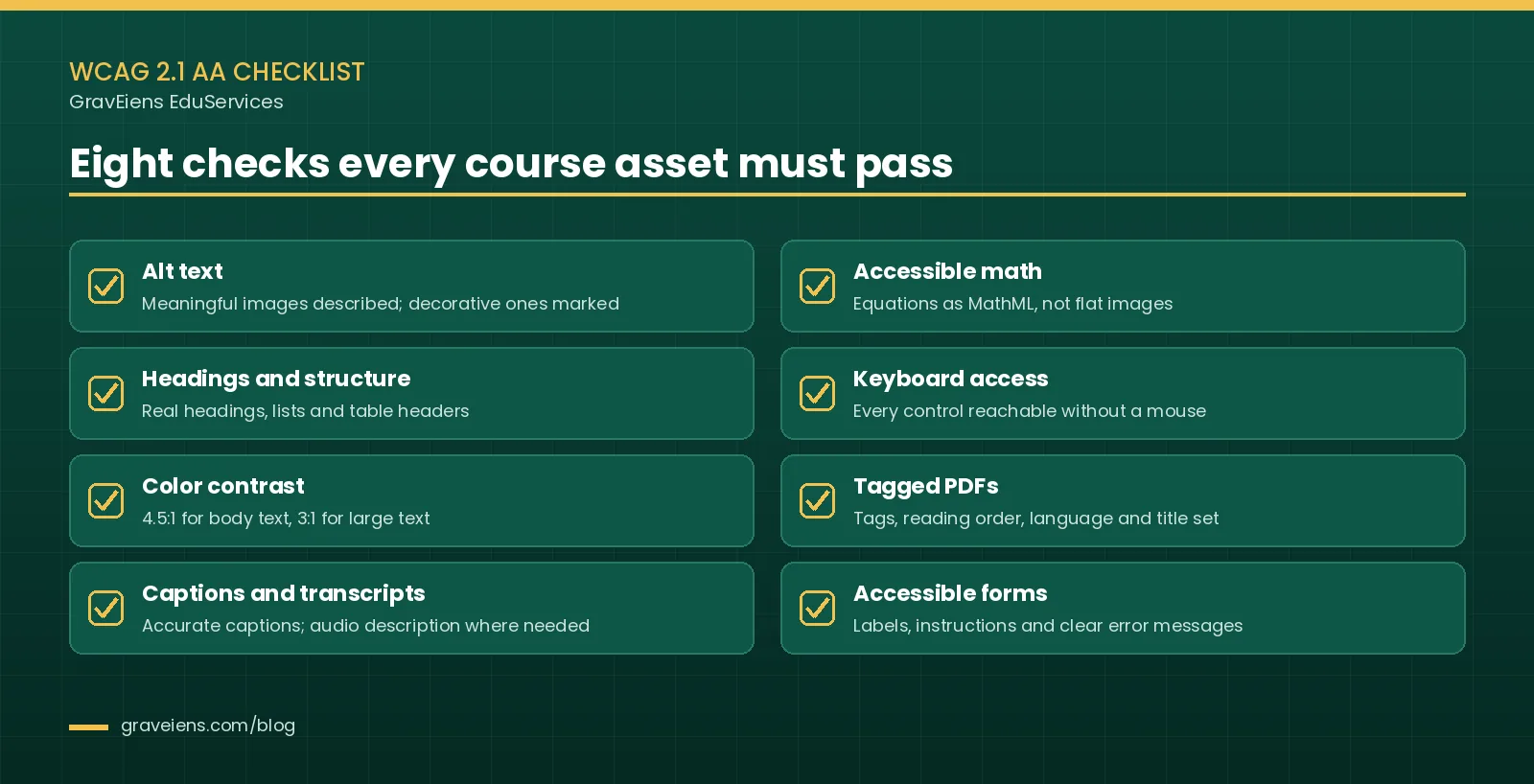
The WCAG 2.1 AA requirement means course content must be perceivable, operable and understandable, and must work reliably with assistive technology. In practice, that comes down to eight recurring checks: alt text, structure, contrast, captions, accessible math, keyboard access, tagged PDFs and accessible forms.
The rule incorporates the June 2018 version of W3C’s Web Content Accessibility Guidelines 2.1. Level AA includes all Level A and Level AA success criteria. The checklist below maps those criteria to the course materials faculty actually produce.
1. Alt text, including alt text for STEM images
Every meaningful image needs a text alternative that conveys its content and purpose. Decorative images get empty alt text. WebAIM’s guide to alternative text stresses that algorithms can describe what an image shows but not what it means in context.
That gap is widest in STEM. A titration curve, a free-body diagram or a gene expression heat map needs a description written by someone who understands the concept being taught. Complex graphics usually need a short alt attribute plus a longer description or data table nearby.
2. Headings and structure
Screen reader users navigate by headings, lists and table headers. Bold text that only looks like a heading is invisible to them. Use real heading levels in LMS pages, Word files and slides, and mark header rows in data tables.
3. Color contrast
Body text needs a contrast ratio of at least 4.5:1 against its background, and large text needs 3:1. WCAG 2.1 also added a 3:1 contrast requirement for meaningful graphics and interface components. Color alone must not carry meaning, such as red for wrong answers.
4. Captions and transcripts
Prerecorded lecture videos need accurate, synchronized captions. Live sessions need live captions at Level AA. Where visuals carry information that the audio does not, prerecorded video also needs audio description. Auto-generated captions are a starting draft, not a finished product, especially for technical vocabulary. Our earlier post on closed captioning in education covers why captions help all learners.
5. Accessible math (MathML)
An equation saved as an image is unreadable to a screen reader unless someone writes out the full expression. Encoding math as MathML lets assistive technology speak, navigate and convert it to braille. For heavy math courses, this is often the largest single remediation task.
6. Keyboard access
Every link, button, quiz control and interactive simulation must work with a keyboard alone, with a visible focus indicator. Drag-and-drop activities and embedded tools are common failure points.
7. Tagged PDFs
An accessible PDF has tags, a logical reading order, a set document language and title, tagged tables and alt text on figures. Section508.gov’s PDF guidance notes that federal policy prefers HTML over PDF where possible, which is sound advice for course readings too.
8. Accessible forms
Quizzes, surveys and registration forms need programmatic labels, clear instructions and error messages that explain how to fix the problem.
How should colleges prioritize remediation? The TRIAGE plan
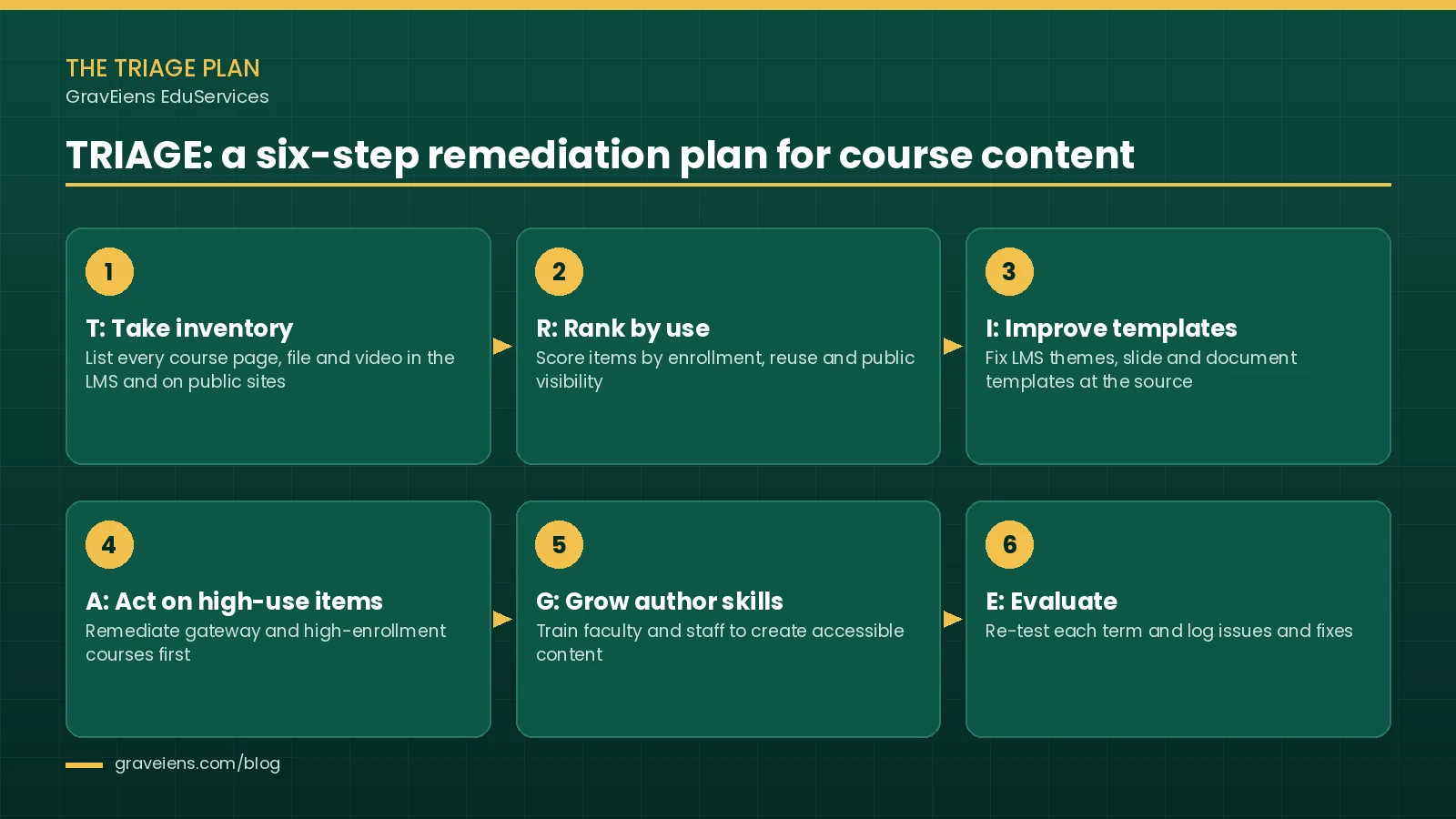
Colleges should prioritize remediation by fixing what the most students touch first and stopping new barriers at the source. Our TRIAGE plan does this in six steps: take inventory, rank by use, improve templates, act on high-use items, grow author skills and evaluate each term.
Most institutions have far more content than they can fix before April 2027. TRIAGE is our original framework for spending limited hours where they reduce the most risk and help the most students.
T: Take inventory
Export a list of every course shell, file, video and embedded tool from the LMS, plus public program pages. Record file type, owner, last-used term and whether a PDF is scanned or born-digital. Run an automated checker for a first pass, knowing it will miss many issues that need human review.
R: Rank by enrollment and use
Score each item by enrollment, number of sections that reuse it, and whether it is public or used to apply, enroll or pay. Gateway courses such as introductory math, chemistry and writing usually rise to the top. So do any courses where a student has an open accommodation request.
I: Improve templates
Fix the LMS theme, course template, syllabus template and slide masters before touching individual files. One corrected template prevents the same error in hundreds of new pages. This is also the cheapest step on the list.
A: Act on high-use content
Remediate the top-ranked items in batches by course, not by file type, so each finished course is fully usable. Retire or archive content nobody uses instead of fixing it. Where a publisher or platform supplies inaccessible material, ask the vendor for a conforming version and record the request.
G: Grow author skills
Train faculty and instructional designers to write alt text, use real headings, check contrast and caption videos as they create. Short, task-based guides work better than long policy documents. Without this step, the backlog refills every term.
E: Evaluate and monitor
Re-test a sample of courses each term with automated tools and manual screen reader checks. Log issues, fixes and vendor requests. That log is also your evidence of good-faith progress.
Want a head start on step one? Ask us for the TRIAGE course-content inventory worksheet through our contact form, or see how our accessibility remediation services handle high-use courses first.
What drives the cost and effort of courseware accessibility remediation?
Remediation effort depends mostly on volume, STEM density, source quality and media minutes. A born-digital humanities reading takes far less work than a scanned engineering text full of equations. The table below shows the main drivers so you can scope realistically before you request quotes.
| Driver | Why it matters | Lower effort | Higher effort |
|---|---|---|---|
| Page or file count | Sets the base volume of work | A few courses | Whole programs or backlists |
| STEM density | Equations and diagrams need expert descriptions and MathML | Text-heavy readings | Math, physics, chemistry, engineering |
| Scanned vs born-digital PDFs | Scans need OCR, correction and full tagging | Exported from Word with styles | Old scans, handwriting, multi-column layouts |
| Video minutes | Captions, transcripts and audio description scale with runtime | Short clips with clear speech | Long lectures, technical terms, visual demos |
| LMS platform and tools | Templates, embeds and third-party tools vary in how fixable they are | Standard pages on one platform | Custom HTML, plug-ins, legacy interactives |
| Turnaround | Compressed timelines need more parallel reviewers | Rolling, term-by-term plan | Large volume due in weeks |
Accessible PDF remediation is often the biggest line item. Converting heavily used readings to accessible HTML or EPUB can cost less over time than re-tagging the same PDF after every edit. Our guide to converting PDF to EPUB explains when that switch pays off.
In-house team or accessibility remediation vendor?
Most colleges need both. An in-house team knows the courses and keeps new content accessible. An accessibility remediation vendor adds capacity for the backlog, especially STEM and scanned material, ahead of a fixed deadline.
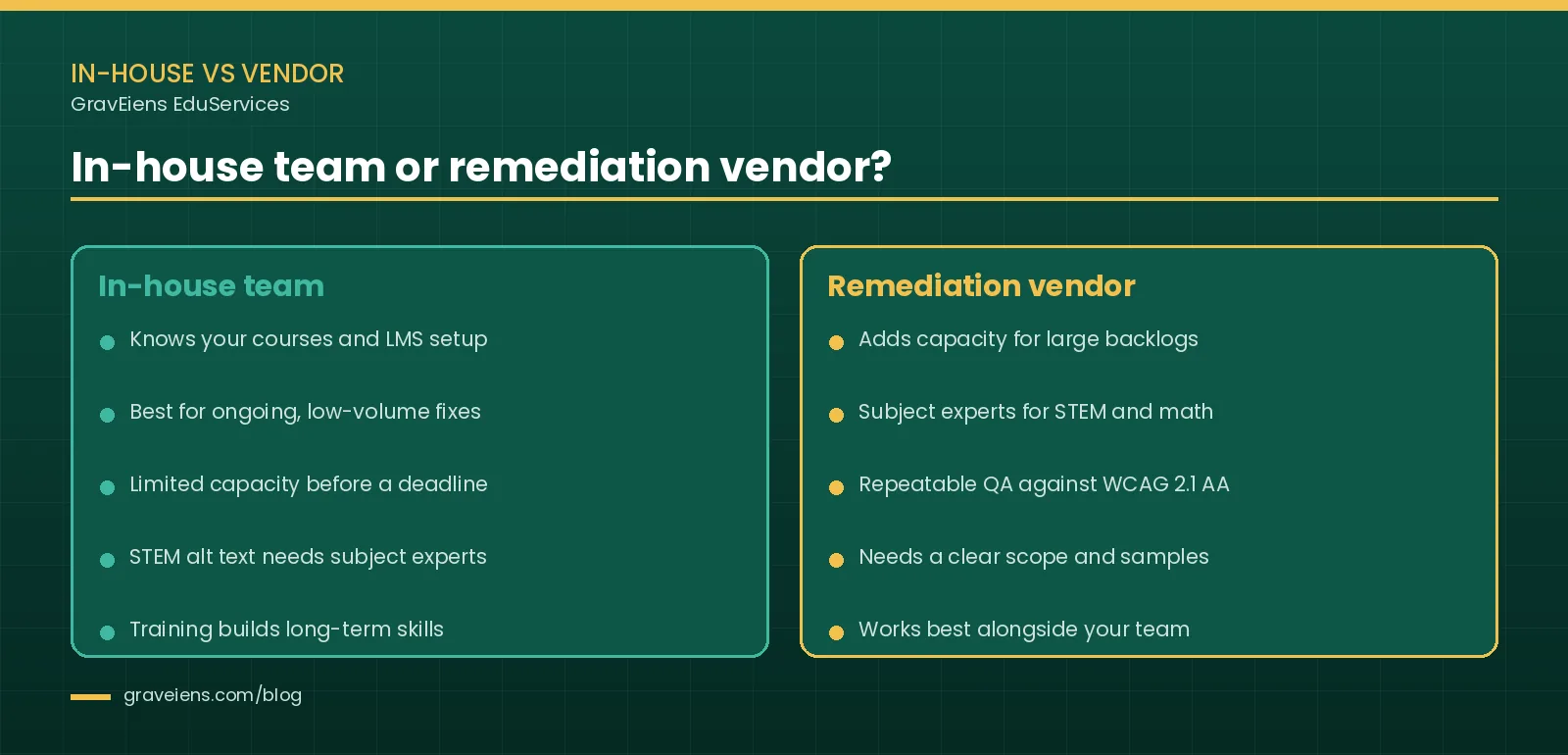
When in-house works best
- You have an accessibility office with trained staff and steady, modest volume.
- Most content is text-based and born-digital.
- The main goal is preventing new barriers through templates and training.
When a vendor makes sense
- The backlog is larger than your team can clear before April 26, 2027.
- Courses carry dense math, science diagrams or scanned sources that need subject experts.
- You need consistent QA across many departments and a clear audit trail.
Questions to ask any remediation vendor
- Who writes alt text for STEM images, and what subject background do they have?
- Which WCAG 2.1 AA checks are manual, and which assistive technologies do you test with?
- How do you handle MathML, scanned PDFs and captions for technical terms?
- What does your QA workflow look like, and how are errors corrected?
- Will you remediate a free sample from our own courses before we sign?
How GravEiens EduServices approaches course content remediation
GravEiens EduServices has built education content since 2017 with a network of 700+ subject experts, and our quality system is ISO 9001 certified. We apply the same subject-first approach to course and document accessibility remediation for universities and publishers.
- Alt text written by subject experts. Writers are matched to the discipline, so chemistry figures go to chemistry specialists and equations to math specialists. Descriptions explain what the learner needs to understand, not just what the image looks like.
- Accessible PDF and EPUB conversion. We tag PDFs for reading order, structure and language, and rebuild heavily used readings as reflowable EPUB 3 or HTML with MathML through our digital EPUB conversion service.
- Captions and transcripts. Lecture captions are reviewed by people who know the subject’s vocabulary, with transcripts delivered alongside.
- QA against WCAG 2.1 AA. Every batch is checked against the success criteria that apply to it, with automated checks followed by manual review.
- A four-stage QA workflow. Content creation, internal review, client review and final delivery. Your team signs off before anything is marked complete.
We work alongside your accessibility office, not around it. Typical engagements start with a sample of your highest-use courses so both teams agree on the standard before volume begins. Learn more about our wider work with universities on our higher education services page.
Frequently asked questions
Was the ADA Title II deadline extended?
Yes. A DOJ interim final rule published April 20, 2026 moved the dates to April 26, 2027 for public entities serving 50,000 or more people and April 26, 2028 for smaller entities and special districts. The WCAG 2.1 AA standard did not change. A lawsuit filed in May 2026 challenges the extension, so plan to the earliest plausible date.
Does ADA Title II apply to private colleges?
No. Title II covers state and local governments, including public colleges and universities. Private colleges fall under ADA Title III and, if they receive federal funds, Section 504. Neither has a dated DOJ web standard, but equal-access duties apply now. Private colleges that receive HHS funding may also be covered by the HHS Section 504 web rule.
Does the rule require WCAG 2.1 or WCAG 2.2?
The Title II rule requires WCAG 2.1 Level AA, specifically the June 2018 version. WCAG 2.2 was designed to be backward compatible, so content built to WCAG 2.2 AA generally meets 2.1 AA too. The rule also allows “equivalent facilitation” when an alternative provides equal or greater accessibility.
Are password-protected LMS courses covered?
Yes. DOJ’s 2023 proposed rule included exceptions for some password-protected course content, but the final 2024 rule removed them. Course pages, files and videos inside an LMS are in scope. The separate exception for individualized password-protected documents covers files about one specific person, such as a student’s bill, not shared course materials.
Do old PDFs in our LMS need to be remediated?
Often, yes. The preexisting documents exception covers files posted before the compliance date, but not documents currently used to participate in a program. A syllabus or reading used in a live course is likely not excepted. Unused files can be archived instead. Confirm edge cases with counsel.
Is automated or AI remediation enough to comply?
No. Automated checkers catch only part of the barriers, and AI tools still struggle with meaning in context. DOJ’s April 2026 interim rule itself noted that generative AI cannot yet reliably automate remediation at scale. STEM descriptions, reading order and caption accuracy need human review.
What happens if a public college misses the deadline?
Title II includes a private right of action, so students and others can sue for injunctive relief and attorneys’ fees, and DOJ can enforce the rule. Complaints under existing Title II duties can be filed even before the compliance date. A documented, prioritized remediation plan shows good-faith progress.
Send us 10 sample pages for a free accessibility audit sample
Pick ten pages that worry you most: a scanned reading, an equation-heavy handout, a lecture slide deck. We will remediate a sample against WCAG 2.1 AA and show you exactly what changed and why. It is the fastest way to size your backlog before the ADA Title II deadline.
Sources
- U.S. Department of Justice, ADA.gov, “Fact Sheet: New Rule on the Accessibility of Web Content and Mobile Apps Provided by State and Local Governments” (updated for the April 2026 interim final rule): ada.gov/resources/2024-03-08-web-rule
- Federal Register, “Extension of Compliance Dates for Nondiscrimination on the Basis of Disability; Accessibility of Web Information and Services of State and Local Government Entities,” 91 FR 20902, April 20, 2026: federalregister.gov, document 2026-07663
- Federal Register, HHS interim final rule extending Section 504 web and mobile accessibility compliance dates, May 11, 2026: federalregister.gov, document 2026-09266
- National Federation of the Blind, “National Federation of the Blind Sues Government over Delay of Accessibility Rules,” May 21, 2026: nfb.org press release
- W3C, Web Content Accessibility Guidelines (WCAG) 2.1, Recommendation of June 5, 2018: w3.org/TR/2018/REC-WCAG21-20180605
About the author
GravEiens EduServices Editorial Team. Our editorial team works with subject experts, instructional designers and accessibility specialists who remediate and build course content for universities, publishers and EdTech companies. We write from day-to-day experience with alt text for STEM images, accessible PDF and EPUB production, captioning and WCAG-based quality review.

 Assessment & Question Banks
Question Bank Development Services: Process, Quality Checks and Cost Drivers
Question bank development services explained: item anatomy, 7-step process, QA checklist and cost drivers. Send your blueprint for 20 free…
 EdTech Outsourcing
Education Outsourcing Companies: How to Choose the Right Content Partner
Compare education outsourcing companies with the 7-point PARTNER check, a pilot-first process, cost drivers and red flags. Request a free…
 Uncategorized
Summative Assessment: Meaning, Types, Examples and How It Differs From Formative Assessment
Summative assessment is a graded evaluation given at the end of a unit, term, course or programme to measure what…
Get monthly EdTech insights
Trends, content tips and how-tos — once a month, no spam.