Last updated: November 2026
Key takeaways
- SCORM packages a course so any conformant LMS can launch it and record completion, score and a resume point through a JavaScript API in the browser.
- xAPI records learning as actor, verb and object statements sent to a Learning Record Store (LRS), so it can track activity outside an LMS, such as apps, simulations and on-the-job tasks.
- cmi5 is an xAPI profile that adds the rules xAPI leaves open: how the LMS launches a course, how the course gets credentials and when it counts as complete.
- The SCORM vs xAPI decision depends on where learning happens. Pick SCORM for the widest LMS support, cmi5 for xAPI data under LMS control, and xAPI with an LRS when learning happens beyond the LMS.
- Most tracking failures come from packaging and testing, not from the standard itself, so test every package in your own LMS before rollout.
SCORM vs xAPI is usually the first question a team faces when it buys an LMS, commissions courseware or plans learning analytics. A third option, cmi5, now sits between the two. Your choice decides what data you can collect and where your courses can run.
This guide is for L&D teams, eLearning managers, EdTech product teams and publishers who deliver courses into other organizations’ platforms. You will get plain definitions, how each standard moves data, a side-by-side table, an original five-question decision check, a packaging workflow and the mistakes that most often break tracking.
Not sure which format your LMS needs? Request a free sample module packaged for your LMS (SCORM or xAPI) and test it on your own platform.
What is the difference between SCORM and xAPI?
SCORM is a packaging and runtime standard. A course runs in a browser window launched by an LMS and reports a small, fixed set of data through a JavaScript API. xAPI is a data standard. Any app or device sends actor, verb and object statements to a Learning Record Store, so it can track learning inside or outside an LMS.
The real SCORM vs xAPI difference is scope. SCORM answers a narrow question well: did this learner complete the course, did they pass, and where should they resume? It does that in almost every LMS, which is why it is still the default format for packaged courses.
xAPI answers a broader question: what did this person do, in which activity, and with what result? A statement can describe a quiz answer, a paused video, a step in a simulation or a supervisor sign-off. The trade-off is setup. You need an LRS, an agreed vocabulary and someone to turn statements into reports.
Both standards trace back to the Advanced Distributed Learning (ADL) Initiative, part of the US Department of Defense. ADL maintains SCORM and sponsored the work that became xAPI. As of November 2026, ADL’s SCORM overview recommends xAPI and cmi5 for new acquisitions and implementations. It also notes that SCORM solutions are still in wide use and keep a great deal of interoperability.
In short: In the SCORM vs xAPI choice, SCORM is the dependable LMS course format and xAPI is the flexible data layer. cmi5 connects the two.
How do SCORM, xAPI and cmi5 track learning?
SCORM content talks to the LMS through a JavaScript API in the learner’s browser, and the LMS stores the results. xAPI content sends JSON statements over the web to a Learning Record Store. cmi5 starts with an LMS launch, then the content sends xAPI statements to the LRS that comes with the LMS, following fixed rules.
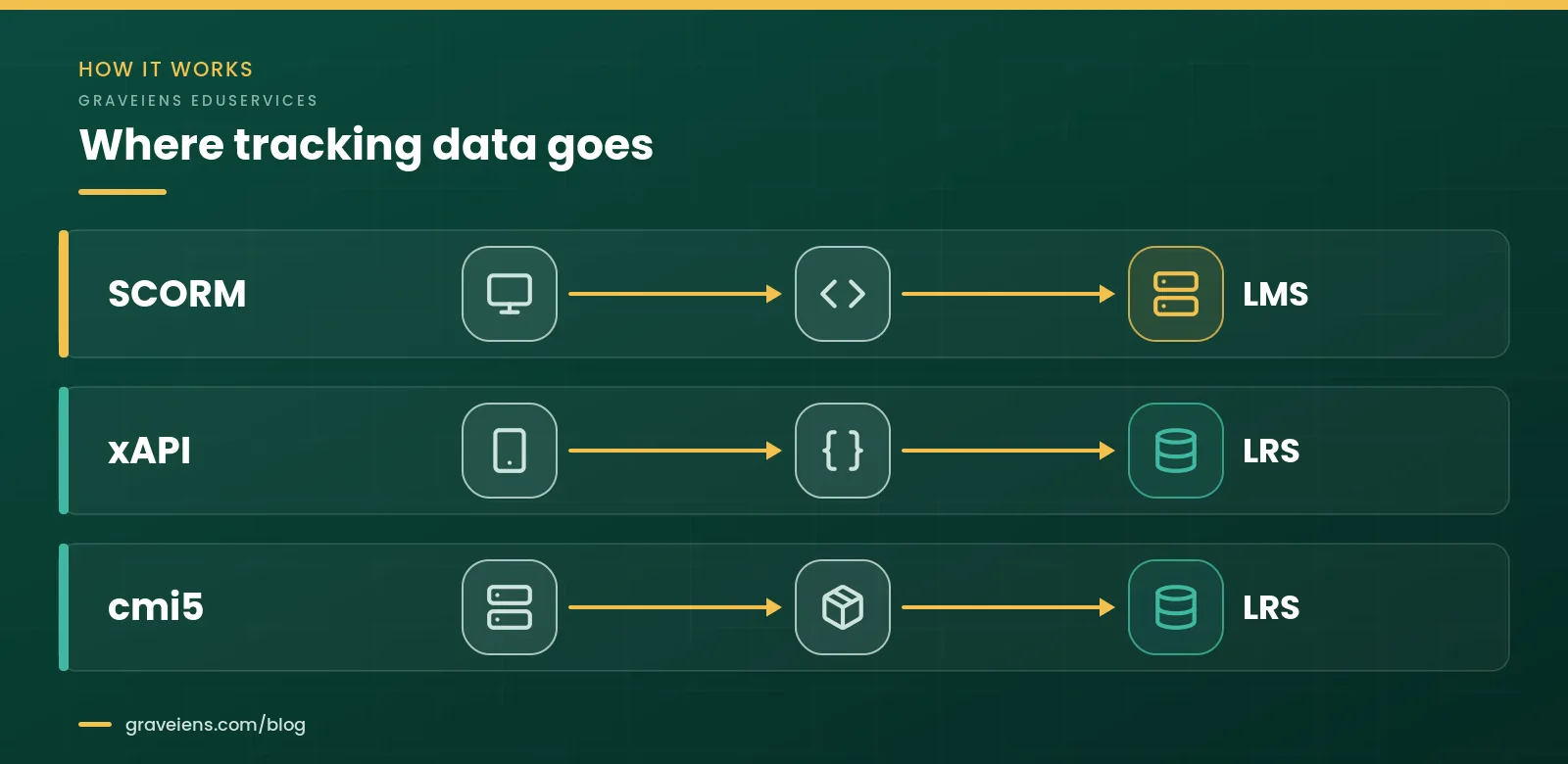
SCORM: a browser API that reports to the LMS
SCORM stands for Sharable Content Object Reference Model. ADL describes it as three technical “books” that work together:
- Content Aggregation Model (CAM). How to package content in a transferable ZIP file, called the Package Interchange Format. An
imsmanifest.xmlfile at the root describes the course. - Run-Time Environment (RTE). A common data model and API, so content and the LMS can exchange data.
- Sequencing and Navigation (SN). SCORM 2004 rules that control the order in which learners move through content.
Each trackable piece of content is a Sharable Content Object (SCO). When it opens, it searches its parent and opener windows for the LMS’s API adapter. In SCORM 1.2 it then calls LMSInitialize, reads and writes values with LMSGetValue and LMSSetValue, and closes with LMSFinish. SCORM 2004 shortens these calls to Initialize and Terminate.
This design is why SCORM is so portable, and also why it is tied to the browser. If the window closes before data is saved, or the API cannot be found, nothing is recorded.
SCORM 1.2 vs SCORM 2004: what changed?
SCORM 1.2, released in 2001, was the first widely adopted version. SCORM 2004 went through four editions, and the 4th Edition, released in 2009, is the most recent. Three differences matter in day-to-day work:
- Status reporting. SCORM 1.2 uses one element,
cmi.core.lesson_status, with six values: passed, completed, failed, incomplete, browsed and not attempted. SCORM 2004 splits this intocmi.completion_statusandcmi.success_status, so a learner can be “completed” and “failed” at the same time. - Resume data. The SCORM 1.2 run-time specification defines
cmi.suspend_dataas a CMIString4096 and says it should be limited to 4,096 bytes. ADL’s SCORM 2004 4th Edition guide for programmers says the same element can hold up to 64K characters. - Sequencing. Only SCORM 2004 includes the Sequencing and Navigation rules for controlling the order of SCOs.
ADL maintains resources for SCORM 1.2, SCORM 2004 3rd Edition and SCORM 2004 4th Edition. For its own defense community it recommends the 3rd Edition, citing wider use and a more recently updated conformance test suite, and it calls the 3rd and 4th Editions about 99% compatible. Outside that community, many teams still default to SCORM 1.2 because nearly every LMS imports it.
xAPI: statements sent to a Learning Record Store (LRS)
xAPI, the Experience API, is a data and interface standard. The ADL xAPI page describes it as agnostic about content type. It can record reading an eBook, pausing a video, progress in a simulation, quiz answers by question or performance on the job.
Every statement has three required parts: an actor, a verb and an object, for example “a learner completed Module 3.” Optional parts such as result, context and timestamp add detail. Statements travel as JSON through a RESTful web API.
The Learning Record Store is the server side of xAPI. ADL describes it as a system that receives, stores and provides access to statements, and validates them so only conformant statements are kept. An LRS can be built into an LMS or run on its own. Course builders should know two parts of it:
- Statement resource. Holds the learning record itself.
- State resource. Holds working data for one learner in one activity, such as a bookmark. This is xAPI’s equivalent of SCORM suspend data.
Rich data has a cost. Core xAPI does not say which verbs to use or when a course counts as complete. Without shared rules, two tools can describe the same event in different ways, and reports stop lining up. ADL’s answer is xAPI Profiles: agreed vocabularies and usage rules for a domain.
Where IEEE 9274.1.1 fits
xAPI is now a formal standard. As of November 2026, the IEEE 9274.1.1-2023 page lists it as an active standard. It standardizes xAPI version 1.0.3 as a JSON data model and RESTful web service for tracking learner experience data, and it was published in October 2023. IEEE also lists an international adoption, ISO/IEC/IEEE 39274-1-1-2025.
For buyers, this means you can write xAPI conformance into a request for proposal with a formal reference. ADL also hosts a public LRS conformance test suite and advises organizations to buy or build an LRS that has passed it.
In short: SCORM keeps data inside the LMS and the browser session. xAPI sends statements anywhere an LRS can receive them, and IEEE 9274.1.1 now formalizes it.
What is cmi5, and how is it different from xAPI?
cmi5 is an xAPI Profile for courses launched from an LMS. The Aviation Industry Computer-Based Training Committee (AICC) and ADL created it. It keeps xAPI as the data layer and adds the rules xAPI leaves open: how the LMS launches content, how content gets credentials, which verbs mark completion and how a course is packaged.
The ADL cmi5 page states the goal plainly: cmi5 replicates SCORM functionality and aims to replace SCORM as the usual format for online courses by using xAPI. The current edition, called Quartz, was first published on 1 June 2016.
How a cmi5 launch works
- The LMS launches an assignable unit (AU) with a URL that carries launch parameters: the LRS endpoint, a fetch URL, the actor, a registration ID and the activity ID.
- The AU sends an HTTP POST to the fetch URL to get a session token, then uses that token for every xAPI request.
- The AU sends an “initialized” statement, then its learning statements, then “completed,” “passed” or “failed” as earned.
- The AU ends the session with “terminated.” If a session ends abnormally, the LMS records “abandoned” on its behalf.
- The LMS applies the course’s “moveOn” rule, such as completed and passed, to decide when the unit is satisfied.
Because content fetches its own short-lived credentials at launch, cmi5 content does not have to live in a browser window. ADL notes it can package and deliver resources such as mobile apps and offline content while the LMS stays in control.
The catch is support: cmi5 import and reporting still vary across LMSs and authoring tools. ADL’s CATAPULT project, completed in 2021, provides a cmi5 player and a downloadable test suite you can use to check conformance. Before you commit, confirm that your exact LMS imports cmi5 packages and reports cmi5 results.
In short: xAPI vs cmi5 is not a contest. cmi5 is xAPI with LMS launch, security and completion rules added.
SCORM vs xAPI vs cmi5: side-by-side comparison
The table below compares SCORM, xAPI and cmi5 feature by feature. Each cell reflects what the official specifications and ADL documentation say, as of November 2026. “Depends” means the spec covers only part of the feature, and the note says which part.
| Feature | SCORM (1.2/2004) | xAPI | cmi5 |
|---|---|---|---|
| LMS launch | Yes. Only the LMS may launch a SCO, in a browser window. | Depends. The spec does not define launch. Content can run with or without an LMS. | Yes. The spec says the LMS must launch each AU. |
| Needs an LRS | No. The LMS stores the data. | Yes. Statements are sent to a Learning Record Store. | Yes. The LMS must also meet the xAPI LRS requirements. |
| Tracks outside the LMS (e.g., mobile apps) | No. Content must find the LMS API in the browser. | Yes. Any app, device or system can send statements. | Depends. Apps and other non-browser content work, but the LMS must launch them. |
| Offline tracking | No. The spec defines no offline mode. The course talks to the LMS’s API during the launched session. | Yes. Each statement carries its own timestamp and can reach the LRS later. | Depends. ADL lists offline content, but each session starts with an LMS launch and a one-time token fetch. |
| Sequencing and navigation rules | Depends. SCORM 2004 only, through its Sequencing and Navigation book. Not in SCORM 1.2. | No. Not defined. | Depends. Blocks, an implied order and “moveOn” results the LMS can use for prerequisites, but no sequencing rule language. |
| Standard completion and pass rules | Yes. Fixed status values: lesson_status in 1.2, separate completion and success status in 2004. | No. The core spec leaves this to you or an xAPI Profile. | Yes. Defined verbs plus the “moveOn” rule for each AU. |
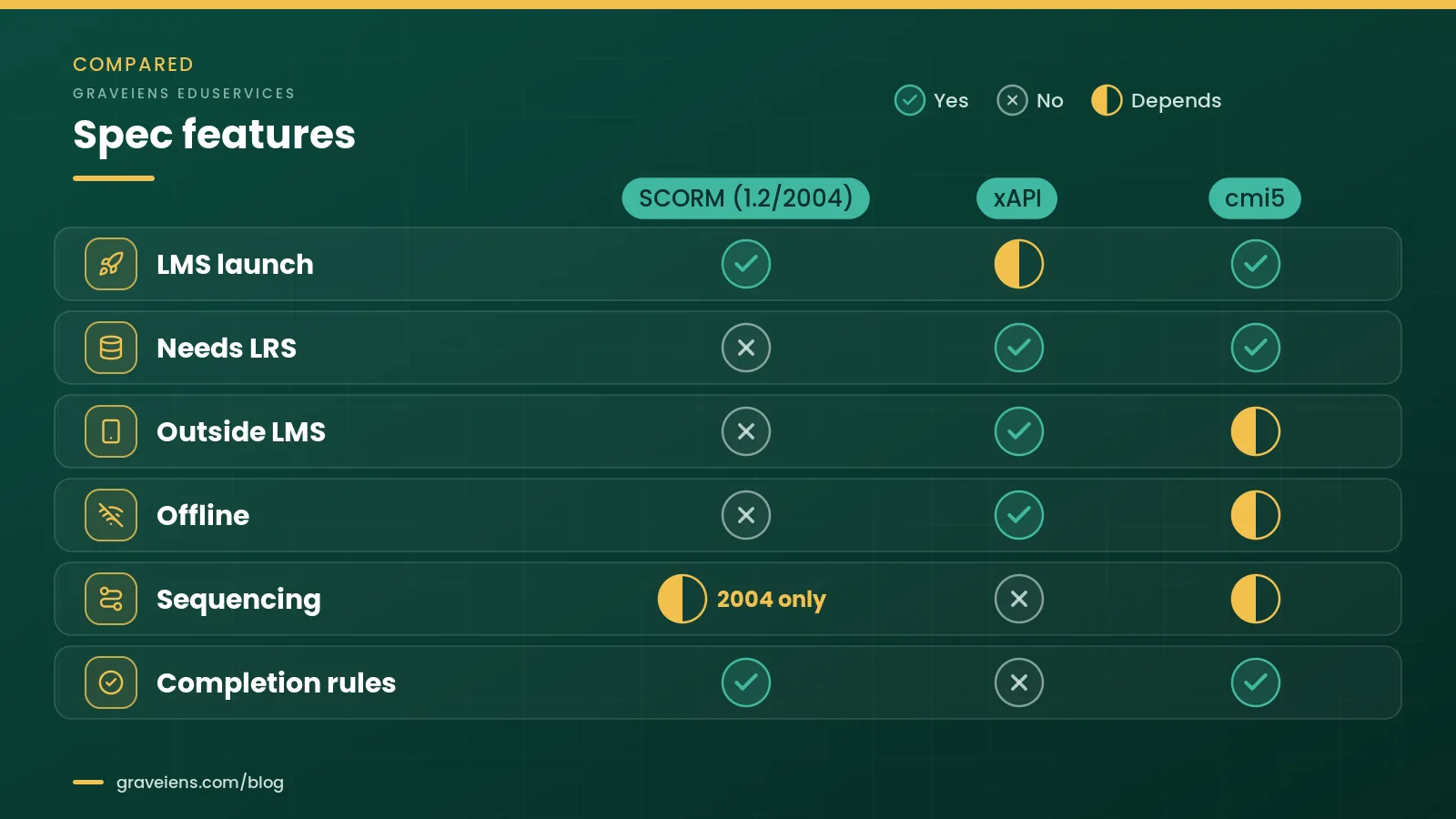
Read this SCORM vs xAPI vs cmi5 table as a map of what each specification defines, not as a ranking. Your LMS, LRS and authoring tools still decide what works in practice, so confirm support on your own platform before you commit.
In short: SCORM is launched by the LMS and has fixed status rules, but no LRS or offline mode. xAPI needs an LRS and can track anywhere. cmi5 adds LMS launch and completion rules to xAPI.
Which eLearning standard should you use? The TRACK Fit Check
Settle the SCORM vs xAPI question by choosing the standard that matches where learning happens, what you need to report and what your platforms can actually import. To make that call repeatable, the GravEiens EduServices team uses five questions we call the TRACK Fit Check. Answer them for each course family, not for the whole library at once.
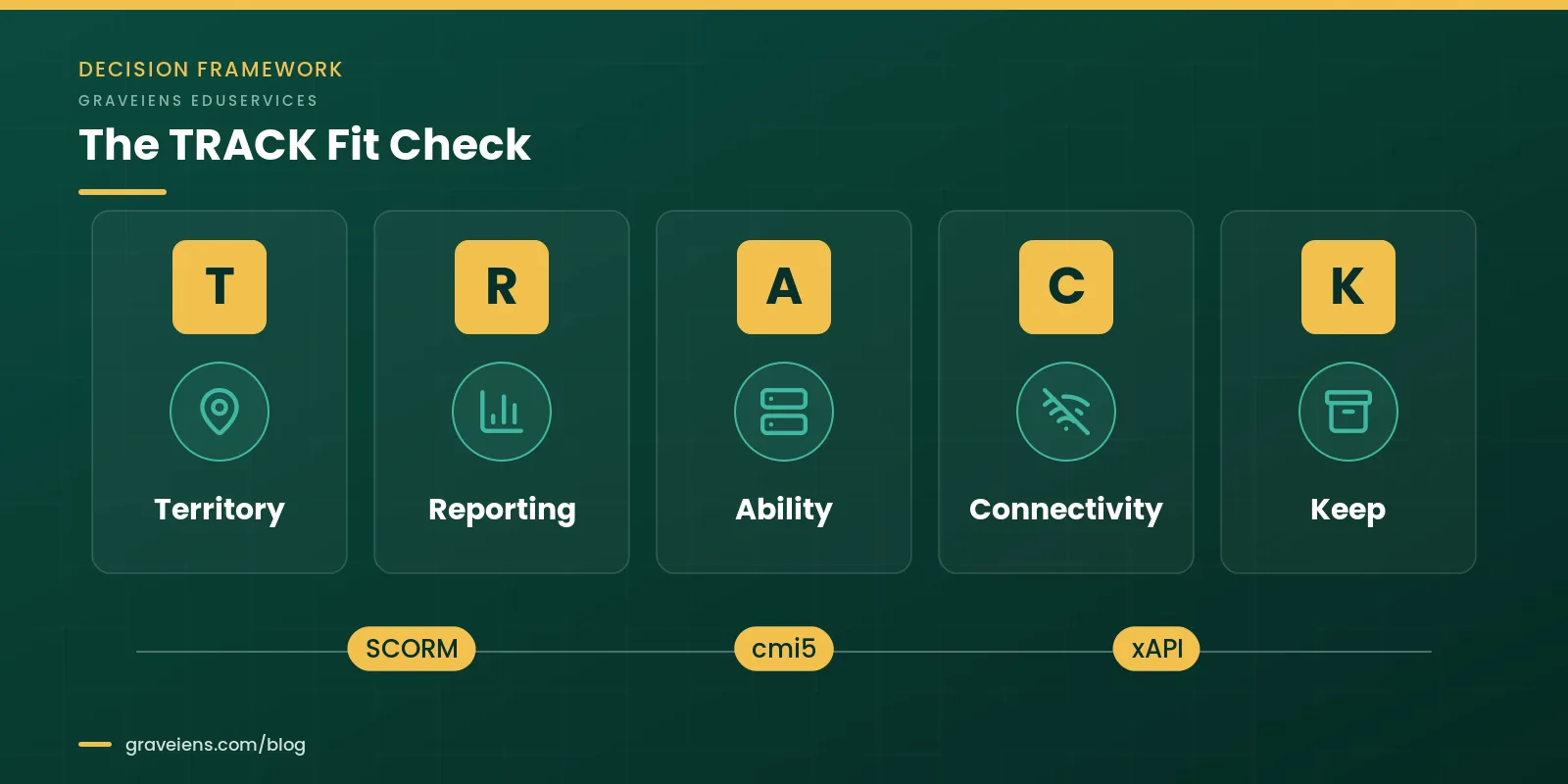
- T: Territory. Where does the learning happen? If it all happens in courses launched from an LMS, SCORM or cmi5 fits. If it also happens in apps, simulations, field work or live sessions, you need xAPI.
- R: Reporting depth. What will you actually report on? If completion, pass or fail, and a score are enough, SCORM does the job. If you need question-level, behavior or cross-system data, plan for xAPI or cmi5.
- A: Ability of your platforms. Does your LMS import cmi5? Do you have an LRS? Can your authoring tool publish each format? If the answer is no, SCORM is the practical choice until your platforms catch up.
- C: Connectivity and devices. Will learners use phones, native apps or work offline? SCORM needs a live browser session with the LMS. Offline or in-app learning points to xAPI, or cmi5 when the LMS launches it.
- K: Keep or migrate. How big is your existing SCORM library, and what will happen to it? A large library usually stays in SCORM while new builds move to xAPI or cmi5. Republish older courses only when they are due for an update anyway.
Once you have the answers, match them to the pattern below.
| Your answers point to | Best fit | Why |
|---|---|---|
| LMS-only courses, completion and score are enough, many different client LMSs | SCORM 1.2, or SCORM 2004 3rd or 4th Edition | Widest import support. Use 2004 if you need separate pass and complete status, sequencing or more resume data. |
| LMS-launched courses, richer data wanted, LMS confirmed to support cmi5 | cmi5 | xAPI data with LMS control, secure launch and defined completion rules. |
| Learning across apps, simulations, field tasks or offline use | xAPI with an LRS and an xAPI Profile | Only xAPI can record activity that never touches the LMS. |
| Large SCORM library plus new analytics goals | Hybrid: keep SCORM, build new courses in cmi5 or xAPI | Protects existing investment while new work gains richer data. |
One tip for publishers and content providers who deliver into many client platforms: treat SCORM 1.2 as the baseline package and offer SCORM 2004 or cmi5 builds on request. That keeps one source project and avoids surprises in older LMSs.
Ran the TRACK Fit Check and still torn between two formats? Request a free sample module and we will package it in the format your LMS needs, so you can test launch, resume and completion yourself. Request the TRACK checklist (mention “TRACK checklist” in your message and we’ll email the one-page PDF).
In short: The TRACK Fit Check sorts each course family by territory, reporting, platform ability, connectivity and legacy library, then points to SCORM, cmi5, xAPI or a hybrid.
How to package or migrate courses without losing tracking
A clean switch between standards is mostly a packaging and testing job. This six-step workflow keeps learner data intact and stops broken packages before they reach learners.
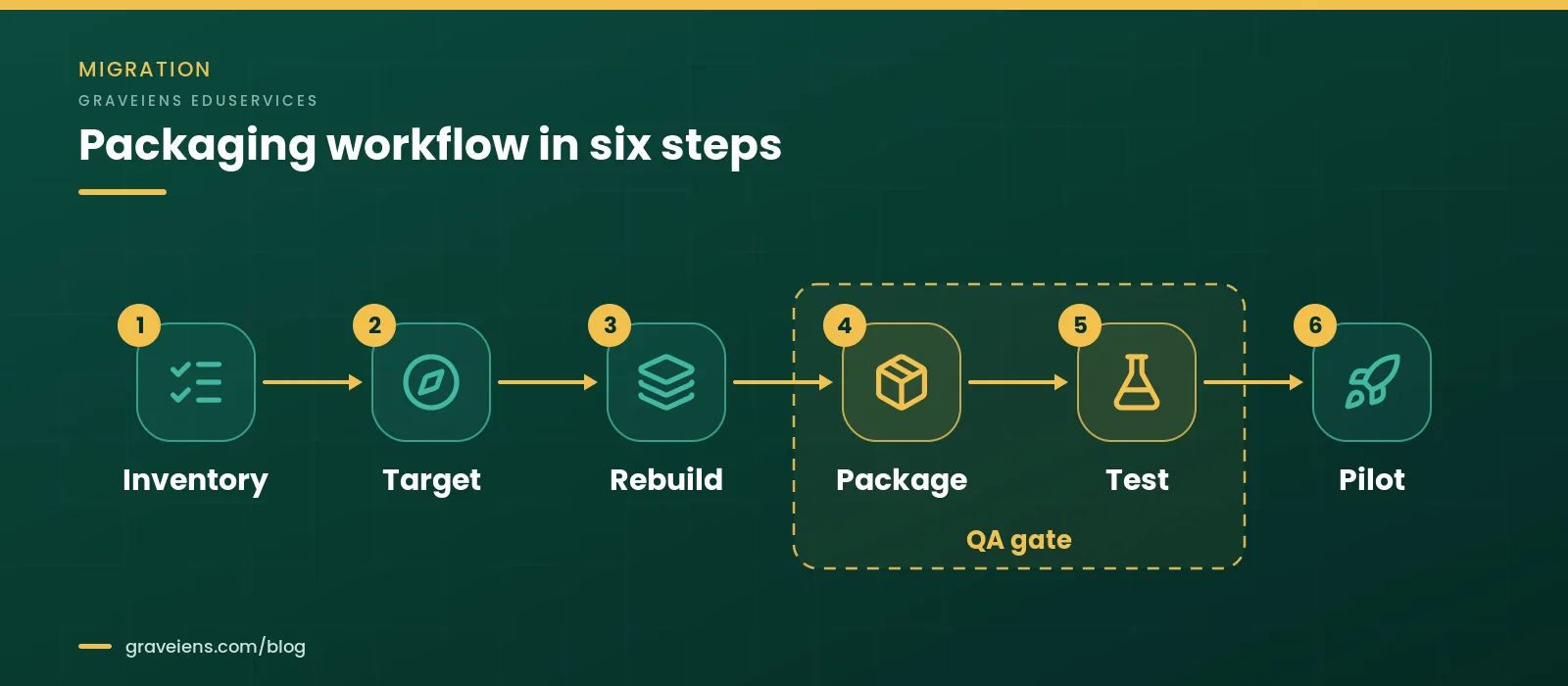
- Inventory. List every course with its current format and version, the authoring source files, the LMS it runs in and the data you actually report on.
- Target. Run the TRACK Fit Check for each course family and pick one target format per family. Avoid one-off formats that only one course uses.
- Rebuild or republish. Republish from source files where you have them. Rebuild where the source is lost or the content is Flash-era. Map old status logic to the new model, for example one
lesson_statusinto separate completion and success values. - Package. Produce the manifest:
imsmanifest.xmlfor SCORM, or the course structure XML for cmi5. Set the mastery score or “moveOn” rule, and fix stable activity IDs. - Test. Check launch, close and resume, completion, pass and fail paths, score, resume data size, several browsers and phones, and the client’s own LMS instance. ADL provides conformance test suites for SCORM and for LRSs, and its CATAPULT project covers cmi5.
- Pilot. Release to a small group. Compare the LMS or LRS reports with what learners actually did, fix gaps, then roll out and document the setup.
What drives packaging and migration effort
We do not publish prices here, but effort follows a few predictable drivers. Use them to size the work before you ask for quotes.
| Effort driver | Lower effort | Higher effort |
|---|---|---|
| Source files | Original authoring files available | Only published output, or Flash-era content |
| Course structure | One SCO or AU per course | Many SCOs or AUs with sequencing rules |
| Interactions | Standard quizzes | Custom interactions reporting question-level data |
| Target platforms | One LMS | Several client LMSs, each tested separately |
| Languages | One language | Each language packaged and tested on its own |
| Accessibility | Already built to WCAG 2.2 AA | Remediation needed while files are open |
In short: Inventory, target, rebuild, package, test and pilot. Most of the risk sits in the package-and-test gate, so give it real time.
Common SCORM and xAPI tracking mistakes, and how to fix them
Whichever side of the SCORM vs xAPI choice you land on, most “the LMS is not tracking” tickets come from a short list of avoidable mistakes. Here are the ones we see most, each with a fix.
- Completion and success status do not match. In SCORM 1.2 one field carries both ideas. If the course reports “completed” but the LMS expects “passed,” learners stay incomplete. Fix: agree the completion rule first, match it in the LMS settings and test both the pass path and the fail path. In SCORM 2004, set completion and success separately.
- Resume data overflows. Long courses with many interactions can exceed SCORM 1.2’s 4,096-byte
suspend_datalimit, and resume then fails or behaves unpredictably. Fix: store less state, split long courses, or publish SCORM 2004 3rd or 4th Edition where your LMS supports it. Test resume at the end of your longest course. - Bookmarking breaks. In SCORM 1.2,
cmi.core.lesson_locationholds only 255 characters, and if the course does not setcmi.core.exitto “suspend” when a learner leaves mid-course, the next launch can start from the beginning. Fix: set the exit value correctly and test close-and-reopen on every package. - Assuming SCORM works offline or inside apps. SCORM needs a live browser session with the LMS API. Fix: for offline or native-app learning, use xAPI with an app that stores statements and sends them later, or cmi5 if the LMS launches the content.
- Exposing LRS credentials in course code. ADL’s own SCORM-to-xAPI wrapper warns implementers to understand their LRS privacy and security features. Hard-coded keys in browser JavaScript can be copied. Fix: use the cmi5 fetch-token launch or a server-side proxy, and never ship long-lived keys in a package.
- Activity IDs change on re-import. When activity IDs are generated from a course’s URL, re-importing the course can create new IDs and split each learner’s history in two. Fix: set fixed activity IRIs before the first release.
- Testing in only one LMS. Each LMS handles details such as pop-up windows, status rollup and data limits a little differently. Fix: test in the client’s actual LMS instance, not just a generic test harness.
Accessibility is a separate requirement
A tracking standard says nothing about whether a course is accessible. SCORM, xAPI and cmi5 move data, but they do not check captions, keyboard access or color contrast. Build to WCAG 2.2 AA alongside packaging. Our guide to WCAG 2.2 for eLearning covers what to test. This is general guidance, not legal advice, so confirm your own obligations with qualified counsel.
In short: Mismatched status, overflowing resume data, broken bookmarks, client-side credentials and drifting activity IDs cause most tracking failures, and each has a simple fix.
How GravEiens EduServices packages courses
GravEiens EduServices has built digital learning since 2017 under an ISO 9001 certified quality system. We work with 700+ experts and have delivered 2M+ digital assets. Every course and package moves through the same four-stage QA workflow: content creation, internal review, client review and final delivery.
Here is how those four stages apply to standards work:
- Content creation. We settle the SCORM vs xAPI vs cmi5 question during scoping, using the TRACK Fit Check, before any build starts.
- Internal review. Packages are checked for launch, resume, completion, pass and fail paths, and scoring before you see them.
- Client review. You review in your own LMS or LRS, because settings differ from one instance to the next.
- Final delivery. The approved package ships in the agreed format, ready to upload.
If you are planning new courses, our custom eLearning development team builds to the standard you choose. If you need existing courses packaged, debugged or moved to a new LMS, see our SCORM-compliant course development and migration services. For broader course builds, start with eLearning content development, and for the full build process read our eLearning development guide. Timelines, LMS test coverage and migration volume depend on your library, so we scope this with you.
Frequently asked questions
Is xAPI replacing SCORM?
Not quickly. The SCORM vs xAPI shift is gradual. ADL recommends xAPI and cmi5 for new acquisitions, but it also notes that SCORM is still widely used and highly interoperable. Most organizations will run both for years: SCORM for existing LMS courses, and xAPI or cmi5 for new work that needs richer data or tracking outside the LMS.
Do I need a Learning Record Store to use xAPI?
Yes. xAPI statements must be sent to a Learning Record Store, which validates and stores them and returns them for reporting. The LRS can be built into your LMS or run as a separate system. ADL advises buying or building an LRS that has passed xAPI conformance testing.
Can one course report to SCORM and xAPI at the same time?
Yes. ADL has published a wrapper that converts SCORM runtime calls into xAPI statements, so a SCORM course can also report to an LRS. Some authoring tools offer similar dual publishing, so check your tool’s documentation. Agree which system is the record of truth for completion, and test for duplicate reporting.
What does SCORM compliance mean?
A SCORM-compliant course, more precisely a conformant one, follows SCORM’s packaging, manifest and runtime rules. That lets a conformant LMS import it, launch it and record its data. Compliance is version-specific, so a SCORM 1.2 package is not automatically valid as SCORM 2004.
Should I choose SCORM 1.2 or SCORM 2004?
Choose SCORM 1.2 for the widest compatibility and simple completion tracking. Choose SCORM 2004, 3rd or 4th Edition, when you need separate completion and pass status, sequencing rules or more resume data than the 4,096 bytes that SCORM 1.2 suspend data allows.
Is xAPI an official standard?
Yes. IEEE 9274.1.1-2023 is an active IEEE standard that formalizes xAPI version 1.0.3 as a JSON data model and RESTful web service. It was published in October 2023, and IEEE also lists an international version, ISO/IEC/IEEE 39274-1-1-2025. That gives buyers a formal reference for procurement.
Does cmi5 replace SCORM?
That is its stated aim. ADL describes cmi5 as replicating SCORM functionality using xAPI, with the goal of replacing SCORM for online courses. Adoption depends on LMS and authoring-tool support, so confirm your platform imports and reports cmi5 before you switch.
Get a free sample module, packaged for your LMS
Tell us your LMS and the standard you are leaning toward: SCORM 1.2, SCORM 2004, cmi5 or xAPI. We will package a sample module so you can test launch, resume and completion on your own platform before you commit.
Sources
- ADL Initiative, “SCORM Overview” (versions, three SCORM books, ADL recommendations). https://adlnet.gov/projects/scorm/
- ADL Initiative, “Experience API (xAPI) Standard” (statements, LRS, endpoints, Profiles, conformance). https://adlnet.gov/projects/xapi/
- ADL Initiative, “cmi5 Specification” (purpose, xAPI Profile, adoption status, CATAPULT). https://www.adlnet.gov/projects/cmi5-specification/
- IEEE Standards Association, “IEEE 9274.1.1-2023” (active standard for xAPI 1.0.3). https://standards.ieee.org/ieee/9274.1.1/7321/
- ADL Initiative, xAPI Specification, Part Two: Data, on GitHub (required actor, verb and object). github.com/adlnet/xAPI-Spec
- ADL Initiative, SCORM Version 1.2: The SCORM Run-Time Environment, section 3.4 (lesson_status, lesson_location, suspend_data).
- ADL Initiative, SCORM Users Guide for Programmers, SCORM 2004 4th Edition (suspend_data up to 64K characters; Initialize and Terminate). adlnet.gov
- AICC and ADL Initiative, cmi5 specification, Quartz edition, on GitHub (launch parameters, fetch URL, verbs, moveOn).
- ADL Initiative, SCORM-to-xAPI-Wrapper, on GitHub (SCORM 2004 status elements, LRS security note, activity IDs).
About the author: GravEiens EduServices Editorial Team
The GravEiens EduServices Editorial Team writes about instructional design, eLearning development and learning standards for L&D, EdTech and publishing teams. Our writers work alongside the instructional designers and developers who build, package and test courses through our ISO 9001 certified, four-stage QA workflow.

 Online Learning
Higher Education Course Development Services: Process, Roles and Cost Drivers
How higher education course development services work: process, team roles, cost drivers and delivery models. Get a scoped quote for…
 Academics
7 Best Explainer Video Ideas for EdTech Organisations
In the age of educational content being available at the fingertips on multiple platforms, learners have tons of options to…
 Academics
11 Effective Tips to Create Educational Videos for College Students
The evidence that videos enhance education is irrefutable. According to a 2015 study, 93% of teachers believe that video improves…
Get monthly EdTech insights
Trends, content tips and how-tos — once a month, no spam.